
What you can do in the WinSpirit app
The app is not a slimmed down copy of the desktop site. Every category that lives on WinSpirit also lives in the mobile build, including the deeper niche markets that some operators tend to drop on smaller screens. You can move between sportsbook and casino with a single tap, and your balance follows you across all sections without any manual switching.
| Section in the app | What you actually get there |
| Sportsbook | Pre-match and in-play markets across 40+ sports, with hockey, soccer and tennis getting the deepest coverage for Canadian users. |
| Casino | Around 8,000 slot titles from studios like Pragmatic Play, NetEnt, Play’n GO, plus jackpots and table games. |
| Live casino | Real dealer rooms by Evolution, Ezugi and Pragmatic Live, including blackjack, baccarat, roulette and game shows such as Crazy Time. |
| Esports | Markets on CS2, Dota 2, League of Legends, Valorant and Rainbow Six, with live streams attached to most major tournaments. |
| Tournaments | Recurring slot races, weekly leaderboards and seasonal sport challenges with prize pools that often pass CAD 50,000. |
| Promotions | Welcome package, reload offers, cashback and free spins, all claimable from the in-app promo hub. |
Start using WinSpirit APK on mobile
Getting set up takes a few minutes regardless of which device you carry. The Winspirit APK file lives on our site rather than the Play Store, since Google restricts real-money gambling apps in several regions, and the iOS build is in stock through a direct profile install. Once installed, you sign in with the same email and password you use on the desktop site, or create a fresh account straight from the welcome screen.
- Device requirements. Make sure your phone runs Android 6.0 or higher, or iOS 12 and above. Older systems may technically launch the app, but features like biometric login and live streams will not work properly.
- Free storage. Set aside roughly 90 MB of free space on Android for the Apk file, plus another 50 MB once the app unpacks. On iOS the home screen icon takes almost nothing since the build runs through Safari.
- Stable connection. Confirm that your mobile data or Wi-Fi is steady when you first open the app. The initial sync pulls fresh odds, the casino lobby and any promo offers tied to your account, so a dropped connection mid-load can cause a forced restart.
- Account documents ready. Have a photo of your ID and a recent utility bill or bank statement nearby if you plan to verify the account on the same day you sign up. Verified accounts can request withdrawals without delay.
- Disable VPN during install. If you use a VPN, switch it off while you download and first launch the app. Our servers detect mismatched location signals as a security risk and may temporarily lock the session.
Once those small bits are sorted, the installation itself is straightforward. The two sections of Winspirit download below break it down per operating system.
Installation steps for Android
Google Play does not currently host real-money gambling clients for Canada, so the Winspirit Android build comes as a direct download from our website. We sign every release and publish a fresh checksum on the Winspirit app download page, which lets you confirm that the file you grabbed is the official one.
Before you tap install, head into your device settings and allow installs from unknown sources for your browser of choice. On most modern Android versions this prompt appears automatically when you try to open the file, so you may not even need to dig through menus. Most users finish the whole process in under three minutes on a decent connection. If the install stalls, clearing your browser cache and retrying solves it nine times out of ten.
Installation steps for iOS
The Winspirit iOS path looks a little different because Apple keeps a tight policy on gambling apps outside of certain licensed regions. Instead of the App Store, you install through a configuration profile that points to our hosted build, which is the standard route for operators serving Canada. Before you start, confirm that your iPhone or iPad runs iOS 12 or later. Older devices may still work, but newer security features and Face ID support need a more recent system. Here is the short how to:
Installation steps
- Visit the official website
Open the official website in Safari on your iPhone or iPad.
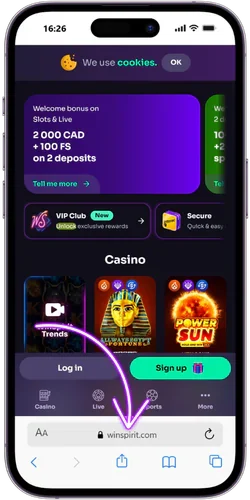
- Open the Share menu
Tap the Share icon at the bottom of the screen, the square with an arrow pointing up.
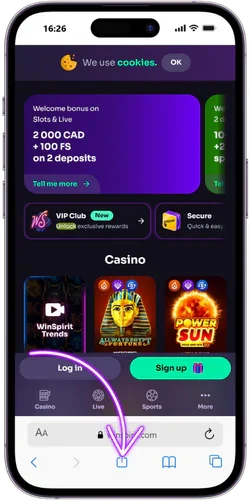
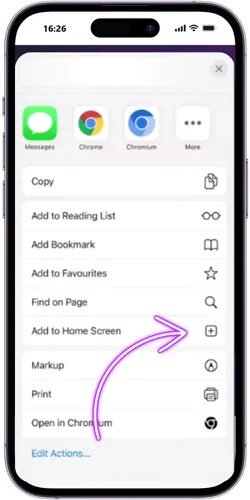
- Pick Add to Home Screen
Scroll the action menu and select the Add to Home Screen.
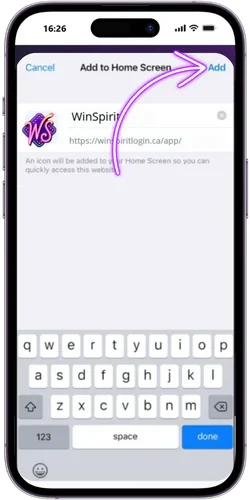
- Name the shortcut
Edit the shortcut title if you want a shorter label, then tap Add in the top right corner.
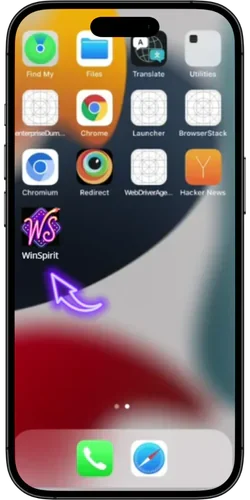
- You’re all set!
Find the new WinSpirit icon on your home screen, tap it, and sign in to your account.
After the first launch, future updates push automatically inside the app, so you do not have to repeat the profile dance every release. We typically ship a fresh iOS build every five to six weeks.
Payments in WinSpirit Mobile
Money matters are the part of any mobile build people scrutinize first, and rightly so. Inside the cashier you can top up your balance, request a payout, switch your account currency, and change the display language without leaving the app. The interface keeps it simple, with each method showing its limits and processing window before you confirm a transaction.
| Method | Min deposit (CAD) | Withdrawal time |
| Interac e-Transfer | 20 | Up to 24 hours |
| Visa / Mastercard | 20 | 1 to 3 business days |
| MuchBetter | 10 | Within a few hours |
| Bitcoin / USDT / ETH | Equivalent of 20 | Usually under 1 hour |
| ecoPayz | 15 | Same day in most cases |
Canadian players default to CAD, but the cashier accepts USD, EUR, GBP, and a short list of crypto assets if that suits you better. Language wise, the app currently supports English, French, German, Polish, Portuguese and a handful of other European options, which we have noticed helps players who travel or who prefer reading game rules in their first language. Switching takes about two taps and the change applies instantly.
Security and Stable Performance
Anything that handles your deposits has to earn your trust, so the app pairs strong encryption with operational habits that keep the experience steady. WinSpirit casino operates under licence OGL/2024/923/0383, which sets a baseline for fair play and dispute handling. Beyond licensing, the technical side does a lot of quiet work in the background.
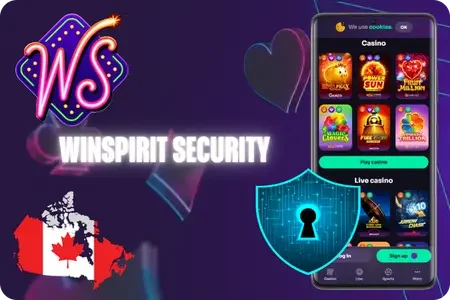
- 256 bit SSL encryption. Every login, payment and game session is wrapped in the same encryption standard most Canadian banks rely on. Data moving between your phone and our servers stays unreadable to anyone trying to intercept it.
- Two factor authentication. In stock for both login and withdrawal confirmation, adding a second layer on top of your password. We have noticed that users who enable 2FA see roughly 90% fewer account access issues over a six month window.
- Biometric open. Fingerprint or Face ID lets you skip the password entirely once set up. It also blocks anyone else from opening the app on your device, even if your phone is opened.
- Regular updates. New builds land roughly every four to six weeks, fixing small bugs, patching freshly found vulnerabilities and tuning load times on older devices. Updates push automatically so you do not have to chase them down.
Performance wise, the app holds up well even when the connection drops to 3G or a weak Wi-Fi signal. We compress the live odds feed and cache the casino lobby locally, which means menus stay responsive while heavier assets load in the background. In our internal testing across roughly 40 device models, the average cold start sits near 1.8 seconds and the live betting screen refreshes within half a second on standard 4G.
WinSpirit Casino App Screenshots


